Showing posts with label SAP BASIS Training Demo. Show all posts

Thursday, 16 November 2017

SAP BASIS Online Training Academy - SAP BASIS Number of Login Attempts

SAP BASIS is a collection of programs and tools that act as integration with database, Operating system, Communication protocols and business applications (such as FI, CO, MM, etc). Full form of BASIS is "Business Application Software Integrated solution".
SAP applications such as FI, CO, SAP PP etc. can interact with each other across different Operating systems and Databases with the help of BASIS.
BASIS is SAP Application Server Technology and alias of NetWeaver (SAP Netweaver training by experts from SAP Trainings Online) is SAP Web Application Server.
After adding java stack (the applications which are developed in J2EE, BSP, ISP etc.) improved security standard for business process. Both ABAP and Java stack can be monitored from one platform. Definitive protocols such as HTTP, SMTP, XML, SOAP, SSO, SSL and Unicode format are promoted by Netweaver (representation of handling text).
BASIS is an operating system for SAP applications and ABAP. It handles contact between operating system, database communication, memory management, runtime collection of application data, web requests, exchanging business data etc...
Basis supports a number of known operating systems (UNIX flavors, Microsoft windows server edition, AS400, z/OS, etc) and databases (Oracle, DB2, Informix, Maxdb, Microsoft SQL Server, etc).
Number of login attempts
You can set the number of incorrect login attempts and then system can end the session or can also lock the user account if parameter value is set by the administrator. The following two parameters are used to limit the login attempts:
Parameter
Parameter is the set of keys with values to manage the specific task in the SAP system.
Static: This parameter doesn’t apply immediately. The system needs restart for this.
Dynamic: This parameter can be applied directly and the system does not need to restart for this.
Login/fails to session end contain the number of unsuccessful login attempts limit defined by the administrator.
  • SAP user can login to the system any number of times with valid credentials
  • If any one of the userid and password is wrongly entered, then attempt to logon count as invalid.
  • The number of logon attempts limit is predefined with specific parameter in system by the administrator
  • These invalid attempts are compared in background with parameter limit and if the max attempts limit is reached then the user gets locked out.
Follow these steps to set the value of parameters:
Step1: Goto RZ11
Step2: It navigates to maintain profile parameters
Step3: Enter the parameter name login/fails to session end and click on display
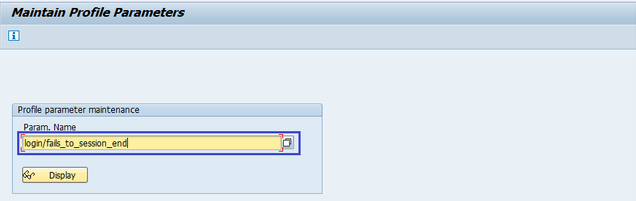
Step4: It navigates to the display profile parameter attributes screen. Current value highlighted below shows the max number of invalid login attempts.
Incorrect login parameters:
Login/fails to session end:
  • Specifies the number of unsuccessful logon attempts
  • The system does not allow any more logon attempts
  • The parameter set to be a value lower than the login/fails to user lock value
  • Default value is 3
  • The allowed values are 1 to 99
Login/fails to user locks
  • Specifies the number of unsuccessful logon attempts before the system locks the user
  • The default value is 5
  • The allowed values are 1 to 99
Login/failed user auto unlock
  • Specifies whether user locks due to unsuccessful logon attempts should be automatically removed
  • Default value is 0
  • Allowed values are 0 or 1  
SAP Trainings Online is only the vicinity where you can trade your future on your brilliant career with our SAP Training courses.it is an interactive global training program started by industry experts with an aim to provide quality SAP BASIS training after the entire route you become well certified professional within the market. 
For more training options visit: www.saptrainingsonline.com
Contact: INDIA:+91 9052775398 USA: +13152825809

Saturday, 4 November 2017

SAP BASIS Online Training | SAP BASIS – SAP Client Administration

Let us first understand what a client is before we move on to SAP client administration. A client is used in SAP system for multiple login on single instance. You can create multiple clients on a single instance. It also provides data security wherein, one user with one client can’t see the data of the other user with another client. In addition, there is no need to install the software for each and every user. SAP BASIS training by experts from SAP trainings Online makes you too become successful SAP consultant.
Client is defined as a self contained business entities or independent accountable business units in commercial, organizational and technical terms. One client is normally referring to one user of SAP system. Once customer maps to only one client at a time. One user with one client cannot able to see the data of another customer on the other client which provides isolated and security.
There is no need to install separate software’s for each user/customer.
Advantages of client concept:
  • Client concept comes in with the following advantages:
  • You can share the same resources between multiple users.
  • You can manage SAP system landscape as you can create multiple clients for DEV, QA and PROD team.
  • You can share your SAP system with a large number of users.
  • You can create clients in SAP system from 000-999.
SAP system comes with the following three standard clients:
000 Client − This is called master client and is available when you install R/3 system.
001 Client − This client is a copy of 000 client including the test company. This client is used to create new clients normally.
066 Client − This is called SAP Early watch and is used for diagnostic scans and monitoring service in SAP system.
Client contains
Application data: Data that are stored in the database tables.
Customizing data: Data created by customers when customizing their systems.
User master record: Defines the authorizations assigned to a user.
Data classification
Data in the database are classified as two types:
Client independent data/cross client data
Client dependent data
Based on these two types, clients have differentiation about the data accessing and displaying.
Client independent data/cross client data:
  • Data created on any client within the system
  • Data can be accessible from any client
  • Data is not specific to any client and it is belonging to all the clients
Ex: screen data, transaction data, repository data and dictionary data.
Client dependent data/Client specific data
Data created on the specific client and can be accessible through same client.
Ex: user data, authorization data, application data
Default Clients
SAP system comes up with three standard default clients.
000-Master client
001-copy of the master client
066-early watch client
000-Master Client
000 clients are available immediately after installing R/3 systems.
Client is called as master client
This client has client independent settings
This client contains test company’s simple organizational structure and includes all applications parameters, settings, configurations and transactions etc.
This client is normally used in business environment
001-copy of master client
Client 001 is called as copy of master client including the test company
Client 001 used to create new clients normally
Client 001 settings are client independent if they are customized or configured.
Client 001 can be customized to move it to the PROD environment
In general, users mostly use 001 client to create a new client
If the client 001 is customized, it won’t behave like master client.
066-early watch client
Client 066 is called as early watch client
Client 066 used to perform early watch service for customer systems
Early watch service is diagnosis and monitoring service for solution monitoring of SAP and non SAP systems.
Early watch service triggers alerts and the alert may contain performance issue, database administration related issues etc,
Client Management Transactions
Want to learn SAP BASIS and build a career in BASIS join, SAP Trainings Online is a deceptively simple e-learning and course authoring solution. Create super-effective training content and deliver courses via Virtual and implant in existing systems. Our training at the speed of business. SAP training program based on present day industry requirements which makes the learners future ready and strengthens you to go challenging with industrial demands. We provide training in many countries India, USA, UK, Canada, Australia, New Zealand.
Try SAP BASIS Demo Class today! To register Click Here
For more details visit: www.saptrainingsonline.com
Email: contact@saptrainingsonline.com
Contact: India +91 9052775398 USA +13152825809

Thursday, 2 November 2017

Learn SAP BASIS Online | SAP BASIS NetWeaver System and its Architecture

SAP NetWeaver is a web-based, open integration, application platform that serves as the foundation for enterprise service-oriented architecture (enterprise SOA) and allows the integration and alignment of people, information, and business processes across business and technology boundaries. It allows the composition, provisioning, and management of SAP and non-SAP applications across a heterogeneous software environment. SAP BASIS training by experienced SAP professional with updated course curriculum from SAP Trainings Online.
The following table defines the Main Use Cases of SAP NetWeaver and its key area:
To implement these use cases, SAP has provided mapping between use cases and SAP NetWeaver software components.
Consider the use case of data warehousing, it has multiple product instances and client tools to use NetWeaver for data warehousing. Learn more from SAP NetWeaver training.
SAP NetWeaver is one of the central components of the entire SAP software stack and provides you a platform for other components and JAVA and ABAP applications. Learn ABAP and its applications see more from SAP ABAP training.
SAP Application server consists of multiple application server instances and also database servers. With use of dialog instance, it also contains message server and an enqueue server.
The following is a dialog instance executed by a user:
These are the different components of the Dialog Instance:
Internal Communication Manager: This is used to process both client and server web requests. It supports protocol – HTTP, HTTPS, SMTP.
Dispatcher: This is used to distribute the user request to different work processes. If all the work processes are busy, requests are stored in the dispatcher queue.
Work Processes: These are used to execute Java or ABAP programs.
SAP Gateway: This provides RFC interface between SAP instances.
Message Server: This is used for message communication and also balances the load in SAP system.
Installation options for SAP NetWeaver
SAP NetWeaver provides the following installation options:
ABAP System: This comes with an integrated VM Container. With this installation, you can run ABAP programs and selected SAP Java applications.
Java System: The components to the right in the above image constitute the Java System. With the installation of this, you can run J2EE applications but not any ABAP programs.
ABAP + Java system: All the components shown in the above image constitute the ABAP + Java System.
Application center and instances
The SAP NetWeaver work center includes the configuration of the following tools:
Adobe Document Services: This allows you to register the Adobe Reader Rights credentials as well as keep track of all unlicensed interactive form designs in your system.
Application Module: This allows you to view the details of the deployed applications and their modules. Here, you can also perform the run-time configuration of the application modules.
Application Resources: This allows you to enable applications to make use of external resources. A NW Administrator can add or delete the application resources.
Authentication and Single Sign-On: This allows you to choose the required authentication mechanism for your applications. You can configure the following authentication and SSO
  • AS Java as a Service Provider
  • Kerberos
Certificates and Keys: This allows you to manage the AS Java certificates and keys.
Composite Application Framework Authorization Tool: This allows you to manage business rules and Instance Level Permissions for CAF applications, business object nodes and AS Java instances.
Configuration Wizard: You can make technical settings required for the technical processing of a system or a technical scenario.
Destinations: This can be used to specify the remote service's address and the user authentication information for remote connections.
Development Infrastructure: This is required while developing with Java and you want to manage it with Transport Management System (TMS).
Identity Management: This allows you as an administrator to control applications access by creating users and providing these users with a means of authenticating themselves to an application.
Internationalization: This allows you to manage data from double stack systems and also used for synchronization purpose.
Java HTTP Provider Configuration: You can create new virtual hosts and configure existing ones for all registered systems.
Java Class Loader Viewer: You can monitor the hierarchy and references between the class loaders in the AS Java.
Java System Properties: Using this, you can view current system configuration of Application server JAVA and you can edit the properties that are marked as online modifiable.
JMS Server Configuration: This is used to create new JMS resources.
Licenses: You can request and install new SAP licenses.
Log Configuration: You can view current log configuration, change security or reset it to default.
Message Server: You can monitor message server parameters and settings.
Managing Java instances using NWA
Follow these steps to change the status of Java instances at runtime.
Step 1: Go to SAP NetWeaver Administrator > Operations > Systems > Start & Stop
Step 2: Now, go to Java Instances tab under NWA.
Step 3: You can see all available instances with corresponding information about the server processes within the instance.
Step 4: Select an instance to perform the following functions under NWA.
  • Start, stop or restart a Java instance.
  • Enable or disable debug mode for AS Java processes.
  • View and refresh OS processes.
  • Clear the DNS cache for a particular instance.
  • Set a number of server processes (nodes).
SAP NW system landscape
Follow these steps to perform the implementation of SAP NetWeaver system:
Step 1: Plan the implementation by defining the scope, hardware and software requirements, and release instructions.
Step 2: Define the system landscape for the use cases.
Step 3: Install the components of SAP NetWeaver system.
Step 4: Configure SAP NW systems.
System landscape management using SAP solution manager
SAP recommends the use of the latest version of the SAP Solution Manager to manage your system landscape. It is important to correctly define your SAP system landscape in the following versions of SAP Solution Manager to maintain it correctly.
SAP solution manager 7.0
You can use the SAP Solution Manager System Landscape transaction code — SMSY for the complete system description.
SAP solution manager 7.1 SP01 to SP04
You can use the Landscape Management Database transaction code — LMDB to maintain technical system information. To maintain logical product information, you can use the transaction code — SMSY.
SAP solution manager 7.1 SP05 and higher
You can use the Landscape Management Database transaction code — LMDB for the complete system description and in this, transaction code — SMSY is no longer required.
How to learn SAP BASIS?
SAP Trainings Online is a deceptively simple e-learning and SAP training authoring solution. Create super-effective training content and deliver courses via Virtual and implant in existing systems. It is very important for BASIS consultant to have hands on experience on live servers. It is right to have training because every scenario could not be created just by installing SAP. We provide training in many countries India, USA, UK, Canada, Australia, and New Zealand.
Register with us for free demo: www.saptrainingsonline.com/student-registration
For more details visit: www.saptrainingsonline.com
Email: contact@saptrainingsonline.com

Wednesday, 1 November 2017

SAP BASIS Training Online | SAP BASIS Hardware and Software Installation

Basis is a set of programs and tools that act as an interface with Database, Operating system, Communication protocols and business applications (such as FI, CO, MM, etc). Full form of BASIS is "Business Application Software Integrated solution". Learn SAP BASIS training from SAP certified professionals by SAP Trainings Online.
SAP BASIS administrators not only make sure all SAP components & applications can communicate with each other, but do so with no end user or backend processing performance degradation. Issues continuously crop up in any technical layer of a SAP landscape and it’s up to SAP Basis support to keep the enterprise cloud, database and application healthy. Basis administrators install updates, monitor the system for errors and tweak SAP to be faster and more reliable.
To implement SAP ERP, we need to find out the minimum hardware and software requirements. The minimum system requirements should be met to perform the implementation successfully.
The following are the minimum requirements for SAP R/3 installation:
Minimum hardware requirements:
  • CPU: Intel PIII 500 MHZ
  • HDD: 30 GB
  • RAM: 256MB
  • Ethernet Card for LAN connectivity
Minimum software requirements:
  • Windows Server
  • Windows Server Service Pack
  • Internet Explorer
  • Database Software Ex: Microsoft SQL Server
  • SAP R/3 System
  • Report Data CD
  • Export CDs
  • SAP GUI
  • SAP R/3 Kernel CD
  • Dynamic Link Libraries or DLL
  • Active Directory Service Interface or ADSI
  • Microsoft Management Console or MMC
Hardware requirements to install SAP ECC 6.0
  • HDD: 250GB + 45GB Hard Disk Space
  • RAM: Minimum 4 GB of RAM: The more the capacity of RAM, the less time it takes for installation
  • CPU: Intel Dual Core or Core 2 Duo Processor: If you have a 64-bit processor, you can go for ECC 6.0 EHP4 instead of ECC 6.0 SR2.
  • CD Drive to copy the software
Software requirements to install SAP ECC 6.0
  • Windows server 2003 32-bit SP 2 or Windows Sever 2003 64-bit OS.
  • Driver CDs
  • Adobe Acrobat Reader for Installation Manual
SAP ECC 6.0 ides SR2 installation will be completed approximately in 20 hours with the above configuration. The installation time can be reduced further by upgrading hardware configuration like quad 2 core processor with 8 GB ram and 1 TB Hard Disk Drive.
It is also possible to integrate SAP ECC 6.0 trial using SAP Cloud Appliance Library ACL to AWS or other cloud environment service provider by providing user public cloud key.
Installation of SAP ECC 6.0
Follow these steps to install SAP ECC 6.0:
Step 1: Install database as per the requirement. Java JDK 1.4 is the minimum requirement. Copy the software to local drive and run sapinst.exe. Set up wizard will open.
Step 2: Select the service you want to install — Central System Installation > Select Service Type – Typical or Custom > Next
Step 3: Select the software units you want to install with ECC like Biller Direct and additional NW software units AS ABAP, etc. (Want to learn ABAP by experts see SAP ABAP training for details).
Step 4: Enter the SAP System ID and Installation drive. SAP System ID is a unique identifier for your SAP system. It must be unique throughout the system landscape. Enter master password which will be used for all user accounts to be created.
Step 5: Enter Database parameters like DBSID for an existing database, host name, etc.
Step 6: Perform perquisite check. You can click OK to perform check or cancel to move to next step.
Step 7: In the next window, you have to provide the location of export files, oracle client and kernel files > Next > Enter OS passwords.
Step 8: Enter the central instance number, which serves as the technical identifier for controlling internal processes such as memory. This number must be unique for this installation.
Step 9: The system now shows you the port numbers.
Step 10: Click Next and you will see the summary of installation.
Step 11: Enter the Solution Manager key to continue the installation and upgrade process.
Step 12: Once the installation is complete, you will receive the following confirmation.
Different hardware and software components in SAP system
The following are the key components in SAP system:
  • Database server
  • Application server
  • Other servers
  • Software components – NetWeaver
  • SAP GUI
  • License key and maintenance certificates
  • Enhancement package
  • Upgrade plans
  • SAP solution manager integration
In SAP system, to check the list of the currently installed software component versions, you can go to SAP GUI, select system.
Choose System in SAP logon> System > Status > click the Component Information icon under system data.
You can see the following two options:
Installed software component versions
Installed product versions
How to learn SAP BASIS?
SAP Trainings Online is a deceptively simple e-learning and SAP training authoring solution. Create super-effective training content and deliver courses via Virtual and implant in existing systems. It is very important for BASIS consultant to have hands on experience on live servers. It is right to have training because every scenario could not be created just by installing SAP. We provide training in many countries India, USA, UK, Canada, Australia, and New Zealand.
Register with us for free demo: www.saptrainingsonline.com/student-registration
For more details visit: www.saptrainingsonline.com
Email: contact@saptrainingsonline.com
Contact: India +91 9052775398 USA +1315282580

Wednesday, 25 October 2017

SAP BASIS Training Course Introduction | Importance of SAP BASIS

SAP BASIS Training is an exclusive layer in SAP architecture. This BASIS component works as the bridge  amid the computing infrastructure, which are like operating system, the database, the network architecture and other SAP modules example FICO, MM, SD, PP, PS, QM etc. SAP Trainings Online incorporates the complete administration of different SAP products; for example like ECC, CRM, SRM, SCM, BI.PI, EP and Solman are some of the modules that are coordinated by SAP BASIS.
Online training module are arranged on interactive virtual platform and with flexi timing advantage for offering all its participants excellent advantage of using their spare time to pursue the training for better career exposure.
Prerequisites to learn SAP BASIS:
To Join SAP BASIS Training at Global Online Training participants are suggested to have
  • Basic knowledge of operating system administration
  • Network management- SAP Netweaver training
  • Database administration.
Overview of SAP BASIS Training
The full form of BASIS is Business Application Software Integrated Solution. Basis is a set of programs and tools that act as an interface with Database, Operating system, Communication protocols and business applications.
The term “Basis” is an reference to the underlying technical architecture of an SAP application. The term encompasses the server infrastructure, software and the server processes that run the SAP application. SAP consultants possess the skills required to administer and configure SAP specific settings in an IT landscape. They are part of a larger organization which may run a landscape consisting of several SAP and Non-SAP applications.
About training
The term “Basis” is an reference to the underlying technical architecture of an SAP application. The term encompasses of the server infrastructure, software & the server processes that run on the SAP application.
It can also be stated as: SAP Basis refers to administration of SAP system that includes the activities like installation & configuration, load balancing, & performance of SAP applications running on Java stack  as well as SAP ABAP.
It also includes the maintenance of different services related to the database, operating system, application & the web servers in SAP system landscape & start and stop of the system.
The SAP Basis supports the installation &configuration of SAP applications on different operating systems like Windows, Unix, AS/400, etc. & also different databases like SQL Server (learn database concepts from SQL server training), Oracle, IBM DB2 for the back end database.
SAP BASIS consists of following components
Client/Server Architecture and Configuration: This is a technical foundation for both SAP and Basis.
A relational database management system (RDBMS): Basis overlaps with various aspects of traditional database administration.
A graphical user interface (GUI): The GUI is the interface through which the Basis administrator can interacts with SAP systems.
A development environment: This is where the Basis development takes place.
A data dictionary: Data dictionaries are indispensable part of development process
User and System Administration monitoring tools: These allow the basis administrator to maintain the integrity and performance of SAP systems and address user requirements.
About SAP BASIS Administrator
SAP Basis administrators are the responsible for keeping all over SAP environments stable, secure and meeting the concerns of users. An SAP Basis administrator needs to check their system logs daily and differentiate between minor glitches and serious problems. 
The key responsibilities of SAP Basis Administrator include:
  • Load balancing on servers
  • System installation and Configuration
  • Managing interfaces and integration with servers
  • Managing servers and different services
  • Performance management of various components
SAP Trainings Online is the world’s biggest unique SAP training resource blended with practical sessions and real time project in training period which includes case studies. Training will be provided by industry experts dedicated to teach expertise skills all the trainers are most experienced and SAP certified professionals in their concerned platform. We provide trainings throughout India, USA, UK, Canada, Australia, Singapore and New Zealand and also in many countries.
Register for free demo with us at: www.saptrainingsonline.com/student-registration
For more details visit: www.saptrainingsonline.com
Email:contact@saptrainingsonline.com 
Contact:  India +91 9052775398 USA +13152825809

Tuesday, 10 October 2017

SAP BASIS Training: Why SAP BASIS Consultants Are In Demand | Skills Required For BASIS Consultant


SAP BASIS: BASIS is a very demanding skill in IT companies. BASIS consultant requirement is always high and there are very less number of experienced consultants available in IT market this makes SAP BASIS high paying job. Hence the demand to SAP BASIS training is growing day by day.
BASIS is a set of programs and tools that act as an interface with database, operating system, communication protocols and other SAP modules like FI, HCM, and SAP SD etc. In SAP Trainings Online SAP BASIS training you will be introduced to different features of BASIS. 
Basis administrators are responsible for ensuring that the SAP application server and applications are installed and configured properly and remain running smoothly.
How to become a BASIS consultant?
SAP Trainings Online is the biggest SAP training resource providing BASIS training with good infrastructure with practical training. It is very important for BASIS consultant to have hands on experience on live servers. It is right to have training because every scenario could not be created just by installing SAP.
Important things need to be considered to be BASIS consultant
  • Good knowledge on OS (UNIX, Linux, Windows). Having good knowledge makes a consultant resolve issue very fast and used for deep analysis. UN IX experience is very advantage in BASIS because most of the companies use LINUX/UNIX servers in there landscapes. (Learn database concepts from LINUX training)
  • It will be an added advantage if one has skills in database like Oracle, DB2 etc. because database concepts are related everywhere.
  • It is more advantageous to have overall SAP skills about its architecture and how it works.

Responsibilities of SAP BASIS consultant
  • Responsibilities include handling the administration part of SAP, including the installation, configuration and maintenance.
  • Installation includes R/3, NW, NW components, solman etc.
  • User admin, client admin, backup etc. are included in administration.
  • Configuration includes printer, RFC, STMS etc.
  • Monitoring the servers, background jobs, system performance and avoiding bottlenecks are done in maintenance process.
  • BASIS consultant need to design and develop SAP architecture requirements and specifications to ensure the system is meeting corporate needs.
  • BASIS consultant’s role is to bring out solutions from advanced and complex technical projects and implement business issues requiring state of the art technical or industry knowledge.

Future Scope for SAP BASIS
SAP BASIS is the person responsible for making SAP system up and running besides making system in healthy state. So, at least SAP BASIS consultant needed to run a SAP system.
SAP BASIS has good scope. If you from database and networking background then SAP BASIS is the best module. If you want to become BASIS consultant, then one must compulsory have practical knowledge. To increase career opportunities you learn advanced topics with practical implementation.
Register for free demo on SAP BASIS: www.saptrainingsonline.com/student-registration
For more details visit: www.saptrainingsonline.com
Email: contact@saptrainingsonline.com
Contact: India +91 9052775398 USA +13152825809