Showing posts with label sap basis online classes. Show all posts

Sunday, 26 November 2017

Online SAP Training | What is the Best SAP Module to Learn Based on Educational Background

The SAP training is becoming more and more competitive as companies across the globe with their business and IT systems utilizing SAP solutions offer multiple job opportunities. With the growth of the competitive job market the curve of SAP consultants is changing drastically. But the only question was which SAP module has to be chosen for career.
SAP Trainings Online is the one stop destination for all SAP courses training providing all SAP technical and SAP functional courses with industry standards. We have team of certified professionals who are dedicated to impart technology into life.
SAP is a business leader in enterprise software solutions aimed at data management and structured work in organizations.
Factors to choose right SAP module
Before applying for the SAP training course, take a moment and go through the factors that can help you choose the right SAP program for you. Have a look.
Choose According to your background
First step towards SAP certified professional would be dipping into one’s academic background and work experience. The existing SAP modules are domain specific, therefore; one need to choose the one that fits the required domain. One will have to ask questions such as “What’s your domain?” “How much experience are you having in your domain?” to aid one in choosing the desired SAP course easily.
The Career goal  This is frequently the most overlooked  although an essential factor in deciding the module of choice. Before selecting any SAP module one needs to recognize whether one's passion, aptitude, and career goals in completion of SAP course.
The educational background of professional plays a large role in the selection of the SAP module in a career. The educational background makes it easier for a professional to comprehend business processes and other related traits involved in the field which has been learned during the academic acquisition of knowledge. It is challenging for process comprehension and understanding amongst such disparate team members, even taking up an inordinate amount of time. Therefore the educational aspect is of paramount importance in the selection of a SAP module. Given below are some of the most popular SAP modules used by companies:
SAP Simple Finance or SAP S/4 HANA Finance
SAP Human Capital Management (HCM)
SAP Materials Management (MM)
SAP Production Planning (PP)
SAP Sales and Distribution (SD)
SAP Financial Accounting and Controlling (FICO)
SAP BASIS
SAP Quality Management (QM )
SAP BASIS
Basis is a set of programs and tools that act as an interface with Database, Operating system, Communication protocols and business applications (such as FI, CO, MM, etc). Full form of BASIS is "Business Application Software Integrated solution". See SAP BASIS training for more info.
SAP BASIS administrators not only make sure all SAP components & applications can communicate with each other, but do so with no end user or backend processing performance degradation. Issues continuously crop up in any technical layer of a SAP landscape and it’s up to SAP Basis support to keep the enterprise cloud, database and application healthy. Basis administrators install updates, monitor the system for errors and tweak SAP to be faster and more reliable.
SAP Simple Logistics
With the introduction of SAP Simple Logistics, has turned out from delivering products to delivering outcomes with simple finance the first suite built on SAP HANA, we are seeing how simple it is to run in a digital economy. With the release of simple logistics we can expect more innovations to bring to business. There is more demand for SAP Simple Logistics training.
SAP Financial Accounting and Controlling
This module deals with the management of financial transactions within organizations. This Financial Accounting module aids employees in the management of data involved in any enterprise and financial transactions in a unified system. This module is highly flexible and functions really well in almost any form of economic situation. This module’s functioning is geared towards handling all sorts of reporting needs. Controlling focuses on providing support in terms of planning, reporting and monitoring operations at the enterprise level.  This module involves methods to look at and organize costs needed for financial reporting. Learn more from SAP FICO training. 
Who can avail the course according to educational background,
If one has been studying Managerial Accounting, Chartered Accountancy (CA), Chartered Institute of Management Accounts (CIMA), Association of Chartered Certified Accountants (ACCA) then SAP CO comes greatly recommended.
SAP Sales and Distribution (SD)
The SD module greatly augments inventory control and management. This module also comprises of master data, system configuration and transactions. A few of the sub-elements of SAP SD module are sales support, shipping, master data, sales, billing, transportation, sales information system, credit management and so on. Learn from SAP SD training.
The scope for advancement from this module onwards can be quite considerable using SAP Hybris and SAP CRM modules (SAP Trainings Online provides SAP CRM training). A major course elective in Distribution techniques, Channel Management, Sales Management, Marketing means a SAP SD module is meant for you.
SAP Production Planning (PP)
The module collaborates with Sales, Master Data, Operations Planning, Product Cost Planning, Material Requirements Planning, Distribution Resource Planning, Kanban and so on and so forth while working towards production management in organizations. Learn in detail concepts from SAP PP training.
SAP Materials Management (MM)
This module deals with the management of materials needed, processed and generated in organizations. Several types of procurement processes are to be managed within this system. See what MM dealt with from SAP MM training. If a candidate has been studying Supply Chain Management with Procurement and Logistics, Inventory Management, and Storage techniques, then this module would be a great choice. After mastering this module one would have gained knowledge and experience in SAP MM.
SAP Quality Management (QM)
The quality management module aids enterprises in speeding up business by an adoption of a structured and functional manner of managing quality in various processes. This module collaborates between audit management, control, notification, inspection, planning, production and even procurement and sales.
For candidates who have taken up studies in Total Quality Management, Statistics, Chemical Engineering and Pharmacy studies, this SAP QM training is considered to be useful.
SAP Human Capital Management (HCM)
This module focuses on enhancing the work process and data management within HR department of organizations. This includes the processes involved from the time a person is hired to evaluate an individual’s performance to managing promotions, compensations, handling and management of payroll and other related activities.
For candidates who have been studying Human Resource, Personnel Management, Comparative Management, and Organizational Management will find this SAP HCM training to be useful to add to their existing skill set.
There are many other modules in SAP; each and every module is different and unique in its own way. They are;
SAP Netweaver
SAP PM (Plant Maintenance)
SAP BO (Business Objects)
SAP BI (Business intelligence) and many
SAP is used by each and every sector now a day’s giving the scope for job opportunities. Some of the areas where SAP software used are
  • Banks
  • Retail
  • Industry
  • Telecommunications
  • Consumer Goods
  • Automotive Industry
  • Media
  • Transport and Logistics
SAP Consultants
An astronomically high demand, a diverse set of job offers and incredible salaries – all point toward how sought-after SAP professionals are in the current market. Increasing amount of companies to utilize SAP software. Or the simple of the fact that most enterprises have lapped up the concept of SAP software through extensive purchasing of said software has contributed to the widespread success of SAP. SAP-skills are highly useful in almost all existing positions today: Marketing, Controlling, Human Resources and a whole lot more. It is important to remember that every business process can be or is already represented in a SAP System.
Conclusion
SAP has been providing immense opportunities for those who have well-defined career goals. But before applying to any SAP module, it is advisable to take some time and weigh the reasons why one would want to go for a particular module. Online courses for SAP that are offered by SAP Trainings Online are of great help to get you where you want to go in your career. They are bound to impart the necessary amount of detailed knowledge and practically based hands-on usage of SAP modules at the time of the candidate’s choosing.

Thursday, 16 November 2017

SAP BASIS Online Training Academy - SAP BASIS Number of Login Attempts

SAP BASIS is a collection of programs and tools that act as integration with database, Operating system, Communication protocols and business applications (such as FI, CO, MM, etc). Full form of BASIS is "Business Application Software Integrated solution".
SAP applications such as FI, CO, SAP PP etc. can interact with each other across different Operating systems and Databases with the help of BASIS.
BASIS is SAP Application Server Technology and alias of NetWeaver (SAP Netweaver training by experts from SAP Trainings Online) is SAP Web Application Server.
After adding java stack (the applications which are developed in J2EE, BSP, ISP etc.) improved security standard for business process. Both ABAP and Java stack can be monitored from one platform. Definitive protocols such as HTTP, SMTP, XML, SOAP, SSO, SSL and Unicode format are promoted by Netweaver (representation of handling text).
BASIS is an operating system for SAP applications and ABAP. It handles contact between operating system, database communication, memory management, runtime collection of application data, web requests, exchanging business data etc...
Basis supports a number of known operating systems (UNIX flavors, Microsoft windows server edition, AS400, z/OS, etc) and databases (Oracle, DB2, Informix, Maxdb, Microsoft SQL Server, etc).
Number of login attempts
You can set the number of incorrect login attempts and then system can end the session or can also lock the user account if parameter value is set by the administrator. The following two parameters are used to limit the login attempts:
Parameter
Parameter is the set of keys with values to manage the specific task in the SAP system.
Static: This parameter doesn’t apply immediately. The system needs restart for this.
Dynamic: This parameter can be applied directly and the system does not need to restart for this.
Login/fails to session end contain the number of unsuccessful login attempts limit defined by the administrator.
  • SAP user can login to the system any number of times with valid credentials
  • If any one of the userid and password is wrongly entered, then attempt to logon count as invalid.
  • The number of logon attempts limit is predefined with specific parameter in system by the administrator
  • These invalid attempts are compared in background with parameter limit and if the max attempts limit is reached then the user gets locked out.
Follow these steps to set the value of parameters:
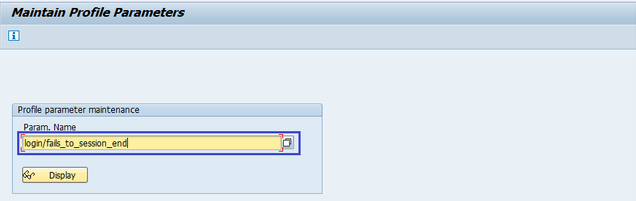
Step1: Goto RZ11
Step2: It navigates to maintain profile parameters
Step3: Enter the parameter name login/fails to session end and click on display
Step4: It navigates to the display profile parameter attributes screen. Current value highlighted below shows the max number of invalid login attempts.
Incorrect login parameters:
Login/fails to session end:
  • Specifies the number of unsuccessful logon attempts
  • The system does not allow any more logon attempts
  • The parameter set to be a value lower than the login/fails to user lock value
  • Default value is 3
  • The allowed values are 1 to 99
Login/fails to user locks
  • Specifies the number of unsuccessful logon attempts before the system locks the user
  • The default value is 5
  • The allowed values are 1 to 99
Login/failed user auto unlock
  • Specifies whether user locks due to unsuccessful logon attempts should be automatically removed
  • Default value is 0
  • Allowed values are 0 or 1  
SAP Trainings Online is only the vicinity where you can trade your future on your brilliant career with our SAP Training courses.it is an interactive global training program started by industry experts with an aim to provide quality SAP BASIS training after the entire route you become well certified professional within the market. 
For more training options visit: www.saptrainingsonline.com
Contact: INDIA:+91 9052775398 USA: +13152825809

Wednesday, 1 November 2017

SAP BASIS Training Online | SAP BASIS Hardware and Software Installation

Basis is a set of programs and tools that act as an interface with Database, Operating system, Communication protocols and business applications (such as FI, CO, MM, etc). Full form of BASIS is "Business Application Software Integrated solution". Learn SAP BASIS training from SAP certified professionals by SAP Trainings Online.
SAP BASIS administrators not only make sure all SAP components & applications can communicate with each other, but do so with no end user or backend processing performance degradation. Issues continuously crop up in any technical layer of a SAP landscape and it’s up to SAP Basis support to keep the enterprise cloud, database and application healthy. Basis administrators install updates, monitor the system for errors and tweak SAP to be faster and more reliable.
To implement SAP ERP, we need to find out the minimum hardware and software requirements. The minimum system requirements should be met to perform the implementation successfully.
The following are the minimum requirements for SAP R/3 installation:
Minimum hardware requirements:
  • CPU: Intel PIII 500 MHZ
  • HDD: 30 GB
  • RAM: 256MB
  • Ethernet Card for LAN connectivity
Minimum software requirements:
  • Windows Server
  • Windows Server Service Pack
  • Internet Explorer
  • Database Software Ex: Microsoft SQL Server
  • SAP R/3 System
  • Report Data CD
  • Export CDs
  • SAP GUI
  • SAP R/3 Kernel CD
  • Dynamic Link Libraries or DLL
  • Active Directory Service Interface or ADSI
  • Microsoft Management Console or MMC
Hardware requirements to install SAP ECC 6.0
  • HDD: 250GB + 45GB Hard Disk Space
  • RAM: Minimum 4 GB of RAM: The more the capacity of RAM, the less time it takes for installation
  • CPU: Intel Dual Core or Core 2 Duo Processor: If you have a 64-bit processor, you can go for ECC 6.0 EHP4 instead of ECC 6.0 SR2.
  • CD Drive to copy the software
Software requirements to install SAP ECC 6.0
  • Windows server 2003 32-bit SP 2 or Windows Sever 2003 64-bit OS.
  • Driver CDs
  • Adobe Acrobat Reader for Installation Manual
SAP ECC 6.0 ides SR2 installation will be completed approximately in 20 hours with the above configuration. The installation time can be reduced further by upgrading hardware configuration like quad 2 core processor with 8 GB ram and 1 TB Hard Disk Drive.
It is also possible to integrate SAP ECC 6.0 trial using SAP Cloud Appliance Library ACL to AWS or other cloud environment service provider by providing user public cloud key.
Installation of SAP ECC 6.0
Follow these steps to install SAP ECC 6.0:
Step 1: Install database as per the requirement. Java JDK 1.4 is the minimum requirement. Copy the software to local drive and run sapinst.exe. Set up wizard will open.
Step 2: Select the service you want to install — Central System Installation > Select Service Type – Typical or Custom > Next
Step 3: Select the software units you want to install with ECC like Biller Direct and additional NW software units AS ABAP, etc. (Want to learn ABAP by experts see SAP ABAP training for details).
Step 4: Enter the SAP System ID and Installation drive. SAP System ID is a unique identifier for your SAP system. It must be unique throughout the system landscape. Enter master password which will be used for all user accounts to be created.
Step 5: Enter Database parameters like DBSID for an existing database, host name, etc.
Step 6: Perform perquisite check. You can click OK to perform check or cancel to move to next step.
Step 7: In the next window, you have to provide the location of export files, oracle client and kernel files > Next > Enter OS passwords.
Step 8: Enter the central instance number, which serves as the technical identifier for controlling internal processes such as memory. This number must be unique for this installation.
Step 9: The system now shows you the port numbers.
Step 10: Click Next and you will see the summary of installation.
Step 11: Enter the Solution Manager key to continue the installation and upgrade process.
Step 12: Once the installation is complete, you will receive the following confirmation.
Different hardware and software components in SAP system
The following are the key components in SAP system:
  • Database server
  • Application server
  • Other servers
  • Software components – NetWeaver
  • SAP GUI
  • License key and maintenance certificates
  • Enhancement package
  • Upgrade plans
  • SAP solution manager integration
In SAP system, to check the list of the currently installed software component versions, you can go to SAP GUI, select system.
Choose System in SAP logon> System > Status > click the Component Information icon under system data.
You can see the following two options:
Installed software component versions
Installed product versions
How to learn SAP BASIS?
SAP Trainings Online is a deceptively simple e-learning and SAP training authoring solution. Create super-effective training content and deliver courses via Virtual and implant in existing systems. It is very important for BASIS consultant to have hands on experience on live servers. It is right to have training because every scenario could not be created just by installing SAP. We provide training in many countries India, USA, UK, Canada, Australia, and New Zealand.
Register with us for free demo: www.saptrainingsonline.com/student-registration
For more details visit: www.saptrainingsonline.com
Email: contact@saptrainingsonline.com
Contact: India +91 9052775398 USA +1315282580

Monday, 30 October 2017

Online SAP BASIS Training: SAP BASIS | Selection of SAP GUI

SAP GUI is a client tool which is used to access remote central server and runs on different operating systems like Microsoft Windows, UNIX, Mac, etc. This is used to manage and access SAP applications like SAP ECC and SAP Business Intelligence System. Want to learn Basis by experts see SAP BASIS training for more details.
As mentioned, there are three different GUIs available and we can select the right version based on the requirement. The following scenario can help you find a suitable SAP GUI:
When users are working rarely in the SAP system: Suppose most of the users fall in this category, then it is suggested to use SAP GUI for HTML format. This allows you to save effort and money for client deployment.
When users are working mostly in the SAP system: In a case such as this, SAP GUI for Windows or SAP GUI for Java is recommended.
When users are ABAP developers: For ABAP developers, it is recommended that they use SAP GUI for Windows. SAP ABAP training by SAP Trainings online gives you the best practical methods teaching.
When users use operating systems other than Microsoft: It is recommended they use SAP GUI for Java and HTML or they can use the SAP GUI for Windows on a remote server.
When users are integrating Dynpro transactions to the portal: It is recommended they use SAP GUI for HTML. This allows you to integrate classic Dynpro-based applications into the portal easily.
SAP Instance and SID
A SAP instance is when you install and configure a SAP system. This instance defines a group of resources — memory, processors and other resources in the system. This allows users to login to the SAP system and share the same resources.
SAP instance is managed by CCMS. Users can login to the SAP system using an instance.
A SAP system can consist of one or more instances you can set up a SAP system with a single instance with only one CCMS or you can configure a system with two or more separate instances in client/server environment.
Configuring a SAP Instance
You need to follow these steps to configure a SAP instance:
Step1: You need to define separate directories for UNIX, AS/400, or Microsoft Windows NT server on which the instance is to run.
Step2: You can use shared file system.
Step3: or each instance, there are entries created in operating system configuration files (/etc/services, /etc).
Step4: There are communication entries created in the host.
Step5: For each instance, start and system profiles are created.
Step6: For each instance, operating system users are installed.
Creating an instance for one server
You need to follow these steps to create an instance for one server:
Step1: To create an instance, you should first define the mode of operation.
Step2: To create an instance, go to CCMS > Configuration or use Transaction code RZ04.
Step3: Go to instances/operation modes as shown in shown in the screenshots below.
Step4: To create a new instance, click on create new Instance — (F6) option as in the following screenshot
Step5: Enter the host name and click on current settings. When application server is already running, the system will display the current settings for that instance.
Step6: If the application server is not running, you should use the input help to display the possible entries and fill the below values.
Step7: Enter the host name and choose current settings. If the application server is already running, the system will display the current settings for that instance. However, if the application server is not yet running, you should use the input help to display the possible entries and fill in the fields.
SAP System Number
The SAP System Number is the number that is mentioned when the SAP System is installed.
Start Profile: profile name
Insert the name of the start profile from Profiles to start the instance. You can also click on “choose the input help” to display a list of available start profiles. You can select a profile from the available list.
Instance profile: Profile name
You have to select the name of instance profile from Profiles to run the instance. You can click on “input help” to display a list of available instance profiles.
SAP BASIS Training
SAP Trainings Online is a unique SAP training platform which provides learners with real time project and case studies included in course content. SAP Trainings Online designed SAP BASIS training program based on present day industry requirements which makes the learners future ready and strengthens you to go challenging with industrial demands. We provide training in many countries India, USA, UK, Canada, Australia, New Zealand.
After of entirety of the route you become well certified professional within the market. There are lot of scholar are licensed with our training course. 
Want take a free demo Click Here: www.saptrainingsonline.com/student-registration
For more details visit: www.saptrainingsonline.com
Email: contact@saptrainingspnline.com
Contact: India +91 9052775398 USA +13152825809