Showing posts with label sap basis training academy. Show all posts

Saturday, 25 November 2017

Online SAP BASIS Training | SAP BASIS Patch Management

Basis is a set of programs and tools that act as an interface with Database, Operating system, Communication protocols and business applications (such as FI, CO, MM, etc). Full form of BASIS is "Business Application Software Integrated solution". Learn SAP BASIS training from SAP certified professionals by SAP Trainings Online.
In SAP system, a patch is used to fix a bug. There are different types of patches that can be used in SAP system. All patches start with SAPK followed by patch type.
The following are the four different types of patches:
  • ABAP (SAPKA620XXXX)
  • BASIS (SAPKB620XXXX)
  • HR (SAPKE470XXXX)
  • APPLICATIONS (SAPKH470XXXX)
SMP provides correction in form of patches. It may contain corrections similar to SAP notes, ABAP programming (Learn ABAP programming from SAP ABAP training by experts from SAP Trainings Online).  It helps to avoid Runtime error and dumps. You can check logs at SPAM. Sometime leaving the TR unreleased caused the issue or some manual correction is required.
In that case we cannot apply sap notes (even if we find them at OSS) as we are stuck in SPAM error phase.  Also in backend user\sap\trans\log and temp file contains the logs for error.
A patch follows this structure — SAPKA <Rel><No>
Patches are also called support packs and they should be applied in the following sequence:
  • BASIS (SAPKB620XXXX)
  • ABAP (SAPKA620XXXX)
  • HR (SAPKE470XXXX)
  • APPLICATIONS (SAPKH470XXXX)
Support packages and add-ons
As the name suggests, support packages are used to fix the bug and to improve the quality of SAP system. Support package implementation and administration is done with Transaction Spam (Support Package Manager). Each support package is valid for one release and Support Package Manager ensures that all support packages are applied in a specified order.
Support packs are applied in the above mentioned order — Basis > ABAP > HR > Applications. It is not necessary that Basis and ABAP patch levels should be same but SAP recommends that they should be at the same level. Generally, Basis and ABAP should be applied together however to apply one first, it should be Basis.
All support packs are applied with client 000. Support packages should be imported at regular intervals to avoid errors and to keep system landscape up to date.
There are different types of support packages available:
SPAM Update − A SPAM Update contains updates and improvements to Support Package Manager (SPAM) and Add-On Installation Tool.
Component Support Package − This contains improvement for one software component such as SAP Basis, SAP HR or SAP APPLICATIONS and to update repository and dictionary objects.
The following table shows some naming conventions for Support Packages:
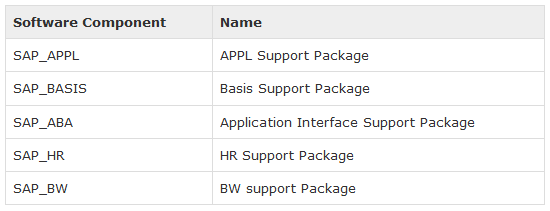
Conflict Resolution Transport − This is used to adjust the support packages on add on. A CRT for one release also contains adjustment for earlier releases of this add-on.
Requirements to implement support package
A support package is always implemented on client 000 and user should have an authorization equivalent to DDIC or SAP.
To implement a support package, use transaction code — SPAM. You can check if any previous package is in progress or is incomplete. If there is an incomplete support package, you can’t proceed with the implementation of a new one.
About SAP BASIS Online Training
SAP Trainings Online is a deceptively simple e-learning and SAP training authoring solution. Create super-effective training content and deliver courses via Virtual and implant in existing systems. It is very important for BASIS consultant to have hands on experience on live servers. It is right to have training because every scenario could not be created just by installing SAP. We provide training in many countries India, USA, UK, Canada, Australia, and New Zealand.
Register with us for free demo: www.saptrainingsonline.com/student-registration
For more details visit: www.saptrainingsonline.com
Email: contact@saptrainingsonline.com
Contact: India +91 9052775398 USA +1315282580

Tuesday, 21 November 2017

SAP BASIS Training | Overview of Transport Management System

Transport Management System is one of the key components in SAP system. TMS is used to control new requests, monitor changes like who has implemented the changes, defining and configuring system landscape in SAP environment. See SAP BASIS training for more details.
  • TMS is used to move, control,   copy development objects like programs, screens etc. And customized settings in an order across the system through predefined transport routes (RFC connections).
  • TMS defines configure and manage the system landscape in SAP environment
  • The transport process is exporting objects from source SAP system and importing objects into the target system.
  • SAP transport management system (TMS) is a tool to manage termed transports on one or more connected SAP systems.
  • User can organize, perform and monitor transports between SAP systems using the transport management systems.
TMS Functions:
  • Configuring transport routs using graphical editor
  • Displaying import queues for SAP system in transport domain
  • Importing all requests in an import queue
  • Importing all requests in project
  • Importing specific requests
  • TMS quality assurance
  • Transport workflow
  • Transports between SAP systems without common transport directory.
CTS
  • CTS helps to organize development projects in ABAP workbench
  • CTS stands for change and transport system
  • CTS tool helps to organize development projects in ABAP workbench (Want to learn ABAP by experts join SAP ABAP training by SAP Trainings Online), retain, documentation and distribution of changes between the SAP systems in system landscape
  • CTS is a tool for configuring system landscape
  • Managing and controlling new development requests
  • Managing transports and recording the source of changes
CTS Components
Change and transport organizer (CTO): it is a tool for managing, browsing and registering the changes on the repository and customizing objects. SE01 is the transaction with the new extended view.
Transport management system (TMS): used to setup transport routes in the SAP system landscape.
Transport Tools (R3trans and TP): used by SAP at operating system level to communicate with SAP and database.
TMS consists of 3 different Change and Transport System (CTS) components:
Change and transport organizer: This is used to manage, configure the changes in SAP repository and other objects. This provides you a central environment for development and configuration projects.
Transport management system (TMS): This is used to manage, control and copy development objects and for customization of settings across SAP systems in landscape using pre-defined transport routes configured with RFC Connections. This includes exporting the objects from one SAP system and importing to another target system.
Transport Tools: Tools are a part of SAP Kernel and are used to manage R3 trans and transport control program.
R3trans is known as SAP system transport which is used to transport the objects between different SAP systems. It is usually called for other transport control program, in particular from tp or by using SAP upgrade utilities.
Transport control program is used to support data and object transport between different systems running on different platforms and also on different database.
Transport domain controller
This is used to manage all TMS configuration details. Any changes to configuration settings are distributed across all systems. To set up the Domain controller, use transaction code — STMS
In case, the SAP system doesn’t have a Domain Controller, you will be prompted to create a new one. Transport domain includes the following activities
User creation TMSADM
RFC connection and request creation, TMSADM is used login to target system
DOMAIN.CFG file is created under user/sap/trans/bin directory which stores TMS configuration and is used by systems and domains for checking existing configurations.
Wanted to learn more about SAP BASIS? Planning to build a SAP BASIS career? Get free demo from SAP Trainings Online. SAP Trainings Online is delighted to be one of the best leading SAP training with best experienced professionals and skilled resources We have been offering courses to beginners, consultants and companies so that they can meet all the challenges in their respective technologies.
Register with us for free demo: www.saptrainingsonline.com/student-registration
For more details visit: www.saptrainingsonline.com
Email: contact@saptrainingsonline.com
Contact: India +91 9052775398 USA +1315282580

Friday, 17 November 2017

Online SAP BASIS Training | SAP BASIS NetWeaver System

A relational database management system (RDBMS): Basis overlaps with many aspects of traditional database administration. A graphical user interface (GUI): The GUI is the interface through which the Basis administrator interacts with SAP systems. A development environment: This is where Basis development takes place. Learn SAP BASIS Training by experts from SAP Trainings Online. 
SAP BASIS emphasizes effective administration of Relational Database Management System (RDBMS), SAP GUI, and client-server architecture. It deals with installing, configuring, updating, patching, migrating, and troubleshooting any kind of problems that your SAP system may face. This means it is about managing the daily operations for a SAP system or its landscape. User administration, system administration, and monitoring tools are also key features of Basis in the SAP system.
SAP NetWeaver is a web-based, open integration, application platform that serves as the foundation for enterprise service-oriented architecture (enterprise SOA) and allows the integration and alignment of people, information, and business processes across business and technology boundaries. It allows the composition, provisioning, and management of SAP and non-SAP applications across a heterogeneous software environment. SAP Trainings Online provides best world class SAP Netweaver training by experts.
The following table defines the Main Use Cases of SAP NetWeaver and its key area:
To implement these use cases, SAP has provided mapping between use cases and SAP NetWeaver software components.
Consider the use case of data warehousing, it has multiple product instances and client tools to use NetWeaver for data warehousing.
SAP BASIS – NW Architecture
SAP NetWeaver is one of the central components of the entire SAP software stack and provides you a platform for other components and JAVA (Learn programming from JAVA online training) and ABAP applications.
SAP Application server consists of multiple application server instances and also database servers. With use of dialog instance, it also contains message server and an enqueue server.
The following is a dialog instance executed by a user:
These are the different components of the Dialog Instance:
Internal Communication Manager − This is used to process both client and server web requests. It supports protocol – HTTP, HTTPS, SMTP.
Dispatcher − This is used to distribute the user request to different work processes. If all the work processes are busy, requests are stored in the dispatcher queue.
Work Processes − These are used to execute Java or ABAP programs.
SAP Gateway − This provides RFC interface between SAP instances.
Message Server − This is used for message communication and also balances the load in SAP system.
Installation options for SAP Netweaver
SAP NetWeaver provides the following installation options:
ABAP System − This comes with an integrated VM Container. With this installation, you can run ABAP programs and selected SAP Java applications (shown in left box).
Java System − The components to the right in the above image constitute the Java System. With the installation of this, you can run J2EE applications but not any ABAP programs. See SAP ABAP training for details.
ABAP + Java system − All the components shown in the above image constitute the ABAP + Java System.
SAP BASIS online course
SAP Trainings Online is a deceptively simple e-learning and SAP training authoring solution. Create super-effective training content and deliver courses via Virtual and implant in existing systems. It is very important for BASIS consultant to have hands on experience on live servers. It is right to have training because every scenario could not be created just by installing SAP. We provide training in many countries India, USA, UK, Canada, Australia, and New Zealand.
Register with us for free demo: www.saptrainingsonline.com/student-registration
For more details visit: www.saptrainingsonline.com
Email: contact@saptrainingsonline.com
Contact: India +91 9052775398 USA +1315282580

Thursday, 16 November 2017

SAP BASIS Online Training Academy - SAP BASIS Number of Login Attempts

SAP BASIS is a collection of programs and tools that act as integration with database, Operating system, Communication protocols and business applications (such as FI, CO, MM, etc). Full form of BASIS is "Business Application Software Integrated solution".
SAP applications such as FI, CO, SAP PP etc. can interact with each other across different Operating systems and Databases with the help of BASIS.
BASIS is SAP Application Server Technology and alias of NetWeaver (SAP Netweaver training by experts from SAP Trainings Online) is SAP Web Application Server.
After adding java stack (the applications which are developed in J2EE, BSP, ISP etc.) improved security standard for business process. Both ABAP and Java stack can be monitored from one platform. Definitive protocols such as HTTP, SMTP, XML, SOAP, SSO, SSL and Unicode format are promoted by Netweaver (representation of handling text).
BASIS is an operating system for SAP applications and ABAP. It handles contact between operating system, database communication, memory management, runtime collection of application data, web requests, exchanging business data etc...
Basis supports a number of known operating systems (UNIX flavors, Microsoft windows server edition, AS400, z/OS, etc) and databases (Oracle, DB2, Informix, Maxdb, Microsoft SQL Server, etc).
Number of login attempts
You can set the number of incorrect login attempts and then system can end the session or can also lock the user account if parameter value is set by the administrator. The following two parameters are used to limit the login attempts:
Parameter
Parameter is the set of keys with values to manage the specific task in the SAP system.
Static: This parameter doesn’t apply immediately. The system needs restart for this.
Dynamic: This parameter can be applied directly and the system does not need to restart for this.
Login/fails to session end contain the number of unsuccessful login attempts limit defined by the administrator.
  • SAP user can login to the system any number of times with valid credentials
  • If any one of the userid and password is wrongly entered, then attempt to logon count as invalid.
  • The number of logon attempts limit is predefined with specific parameter in system by the administrator
  • These invalid attempts are compared in background with parameter limit and if the max attempts limit is reached then the user gets locked out.
Follow these steps to set the value of parameters:
Step1: Goto RZ11
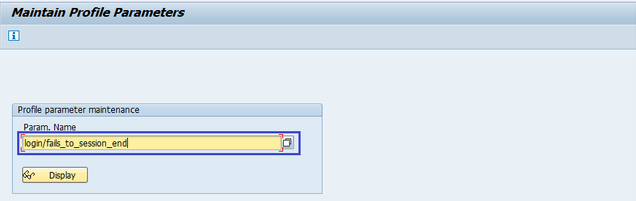
Step2: It navigates to maintain profile parameters
Step3: Enter the parameter name login/fails to session end and click on display
Step4: It navigates to the display profile parameter attributes screen. Current value highlighted below shows the max number of invalid login attempts.
Incorrect login parameters:
Login/fails to session end:
  • Specifies the number of unsuccessful logon attempts
  • The system does not allow any more logon attempts
  • The parameter set to be a value lower than the login/fails to user lock value
  • Default value is 3
  • The allowed values are 1 to 99
Login/fails to user locks
  • Specifies the number of unsuccessful logon attempts before the system locks the user
  • The default value is 5
  • The allowed values are 1 to 99
Login/failed user auto unlock
  • Specifies whether user locks due to unsuccessful logon attempts should be automatically removed
  • Default value is 0
  • Allowed values are 0 or 1  
SAP Trainings Online is only the vicinity where you can trade your future on your brilliant career with our SAP Training courses.it is an interactive global training program started by industry experts with an aim to provide quality SAP BASIS training after the entire route you become well certified professional within the market. 
For more training options visit: www.saptrainingsonline.com
Contact: INDIA:+91 9052775398 USA: +13152825809