Showing posts with label best sap basis online training. Show all posts

Thursday, 14 December 2017

SAP BASIS Tutorial | Support Package and Stack Upgrade: SAP SPS


What is a support package?
  • When an end user of SAP finds a bug in the SAP product, he reports the same to SAP support. SAP programmers inspect the bug and develop a correction for the bug. This correction is known as SNOTE (SAP Note).
  • With time, multiple end users, report bugs for which SAP releases SNOTE. SAP collects all these corrections in one place and this collection is called SUPPORT PACKAGE. This support package also includes enhancements to earlier versions of SAP.
  • Support Packages are implemented in SAP system using Transaction SPAM (Support Package Manager)
Learn more about support packages from SAP BASIS training by industry leading experts by SAP Trainings Online.
What is support package stack (SPS)?
The support package stack is a list of ABAP and Java support packages for all software components (SC) included in SAP Netweaver (See SAP Netweaver training for more details). It is used to bring each Software Component of SAP NetWeaver to a defined Support Pack (SP) level.
Support Package Stack, commonly known as STACK bundles all required components or individual patches that are already tested together and recommended applying as SPS instead of individual patch (until and unless you face some problem which requires certain components to be patched).
What are support pack stack version numbers?
Support Package Stacks have a release number, and a Stack number, Example, SAP NetWeaver '04 Support Package Stack 11.
Each software component has a separate sequence of support packages:
The following list contains the technical names of a number of components and the notation for their support packages:
COP (Component Package)
SAP_APPL (SAP APPL Support Package): SAPKH<rel><no>
SAP_BASIS (Basis Support Package): SAPKB<rel><no>
SAP_ABA (Application Basis SP): SAPKA<rel><no>
SAP_HR (SAP HR Support Package): SAPKE<rel><no>
SAP_SCM (SCM Support Package): SAPKY<rel><no>
SAP_BW (BW Support Package): SAPKW<rel><no>
SAP_CRM (CRM Support Package): SAPKU<rel><no>
Pre-requisites for Support Package implementation
  • Support packages should be always applied in client 000.
  • The user to be used for the support package implementation must have authorizations equivalent to DDIC or SAP*
  • Call the transaction SPAM and see if any previous Support Package import is incomplete. You can proceed ahead unless the previous support package import is successful.
  • Ensure that there is enough space in the transport directory. The transport directory is located at /usr/sap/trans
Steps to upgrade the support package
Step1: Download support packs
Support packages are available in SAP support portal
Step2: Loading support packages
To load support packages we have two options:
From application server
From front end
From Application server
Download the support packages from service marketplace and save then at OS level in directory/usr/sap/trans
Uncompress these files using sapcar executable
Step 3: SPAM/SAINT Update:
  • A SPAM or SAINT update contains updates and improvements to support package manager (SPAM) and addon installation tool (SAINT). There is always one spam update for each release. SPAM/SAINT update is mandatory before any support package upgrade.
  • On the initial screen in Support Package Manager, choose Display/Define.
  • A list of installed software components (for example, SAP_BASIS, SAP_HR, SAP BW training) is displayed.
Once you select the required component, the current queue appears. This queue contains the Support Packages available for the selected component in your system. If you want to define the queue for another software component, choose Other Component. If the displayed queue meets your requirements, you can confirm it by choosing Confirm Queue
Importing Queue
Once you a define a Queue (Step 4) while selecting a particular component (for which we want to upgrade support pack), we need to do 'Import queue' to start importing/applying that particular selected support pack (as per the standard SAP process).
Choose Support Package --> Import Queue
Conforming Queue
Confirm that the queue has been imported successfully into your system. This allows you to import Support Packages in the future. You will not be able to import Support Packages further, if you do not confirm the queue.
Once Queue has been imported, SPAM status becomes YELLOW
Want to learn SAP BASIS and build a career in BASIS join, SAP Trainings Online is a deceptively simple e-learning and course authoring solution. Create super-effective training content and deliver courses via Virtual and implant in existing systems. Our training at the speed of business. SAP training program based on present day industry requirements which makes the learners future ready and strengthens you to go challenging with industrial demands. We provide training in many countries India, USA, UK, Canada, Australia, New Zealand.
Try SAP BASIS Demo Class today! To register Click Here
For more details visit: www.saptrainingsonline.com
Email: contact@saptrainingsonline.com
Contact: India +91 9052775398 USA +13152825809

Monday, 11 December 2017

SAP BASIS Training | SAP BASIS User Activities


SAP BASIS
administrators control the access to applications by creating users, maintaining the same users. Users can be collected in groups according to the criteria in a company or a department and based on roles they perform in the project. A typical company will have several separate SAP systems running for production, development, testing and SAP BASIS training, and perhaps a high-availability system mirroring production on top of everything else. Admins will have to keep all of these systems updated, optimized and communicating with each other.
Roles can be defined to either users individually or to the user group. Roles define the user’s authorization levels to navigate or access the specific set of functions or crucial applications.
Authorizations are the key building blocks of SAP security system. How to secure SAP system can be learnt from SAP Security training by SAP Trainings Online with best experienced faculty.
Authorization is the known process of assigning designated values to fields present in authorization objects.
Access to all system functionality in SAP is achieved through a compound set of authorizations
If the users do not have the necessary authorizations to perform a certain action in the system, predefined message. You are not authorized is displayed on the status bar of the screen.
User administration includes creating, managing and controlling access to R/3 system, various R/3 user types and its data.
The SAP NW application server (Learn from SAP NetWeaver training) java includes the identity management application for administration of users, groups and roles.
User administration major tasks are:
  • Creating user
  • Locking or unlocking user
  • Deleting user
  • Approving or rejecting users
The below diagram explains how users are connected to the servers:
SAP user types:
There are 5 different types available in SAP system:
  • Communication
  • Dialog
  • Reference
  • Service
  • System
Communication users
Users are not allowed / possible to logon using SAP GUI and cannot able to access the data through SAP GUI screens.
Users are allowed to change the password if expired using external link.
SAP system always checks for the password expiry, initial password and prompts when it requires to change depends on the logon method. Main use of the users is for external RFC calls
These users can access the SAP system data through front end or external applications.
Dialog users:
Users are allowed to logon using SAP GUI and able to access data through SAP GUI screens
System validates the password expiration initial password and multi logons
The user can change the password by their own using SAP GUI
These users are individual users and individual personalized system access allowed.
Reference users:
Users are not allowed to logon using SAP GUI and cannot able to access the data through SAP GUI screens.
System doesn’t check for initial password and password expiration.
Users for general, non person related which allows the assignment of additional authorizations to the users like internet users.
These users used to give authorization to other users.
Service users:
Users are allowed to logon using SAP GUI and can able to access the data through SAP GUI screens
System doesn’t check for initial password and password expiration.
Multiple logins are allowed for this kind of users
Users are not allowed to change the password and only administrator can change the password.
These users have very restricted authorizations
These types of users are created for anonymous users.
After an individual authentication, an anonymous session begin with service user can be continued as a person related session with a dialog user.
System users:
Users are not allowed to logon using SAP GUI and can able to access the data through SAP GUI screens.
System doesn’t check for initial password and password expiration.
Users are related system related and internal system processes.
The password change requirement does not apply to these user’s passwords and it cannot be initial or expired.
Only user administrator can change the password and multiple logons are permissible.
These users are for background processing, external and internal RFC calls.
How to learn SAP BASIS?
SAP Trainings Online is a deceptively simple e-learning and SAP training authoring solution. Create super-effective training content and deliver courses via Virtual and implant in existing systems. It is very important for BASIS consultant to have hands on experience on live servers. It is right to have training because every scenario could not be created just by installing SAP. We provide training in many countries India, USA, UK, Canada, Australia, and New Zealand.
Register with us for free demo: www.saptrainingsonline.com/student-registration
For more details visit: www.saptrainingsonline.com
Email: contact@saptrainingsonline.com
Contact: India +91 9052775398 USA +1315282580

Tuesday, 28 November 2017

SAP BASIS Training Hub | Installation of SAP BASIS Hardware and Software

Basis is a set of programs and tools that act as an interface with Database, Operating system, Communication protocols and business applications (such as FI, CO, MM, etc). Full form of BASIS is "Business Application Software Integrated solution". Learn SAP BASIS training from SAP certified professionals by SAP Trainings Online.
SAP BASIS administrators not only make sure all SAP components & applications can communicate with each other, but do so with no end user or backend processing performance degradation. Issues continuously crop up in any technical layer of a SAP landscape and it’s up to SAP Basis support to keep the enterprise cloud, database and application healthy. Basis administrators install updates, monitor the system for errors and tweak SAP to be faster and more reliable.
To implement SAP ERP, we need to find out the minimum hardware and software requirements. The minimum system requirements should be met to perform the implementation successfully.
The following are the minimum requirements for SAP R/3 installation:
Minimum hardware requirements:
  • CPU: Intel PIII 500 MHZ
  • HDD: 30 GB
  • RAM: 256MB
  • Ethernet Card for LAN connectivity
 Minimum software requirements:
  • Windows Server
  • Windows Server Service Pack
  • Internet Explorer
  • Database Software Ex: Microsoft SQL Server
  • SAP R/3 System
  • Report Data CD
  • Export CDs
  • SAP GUI
  • SAP R/3 Kernel CD
  • Dynamic Link Libraries or DLL
  • Active Directory Service Interface or ADSI
  • Microsoft Management Console or MMC
Hardware requirements to install SAP ECC 6.0
HDD: 250GB + 45GB Hard Disk Space
RAM: Minimum 4 GB of RAM: The more the capacity of RAM, the less time it takes for installation
CPU: Intel Dual Core or Core 2 Duo Processor: If you have a 64-bit processor, you can go for ECC 6.0 EHP4 instead of ECC 6.0 SR2.
CD Drive to copy the software
Software requirements to install SAP ECC 6.0
Windows server 2003 32-bit SP 2 or Windows Sever 2003 64-bit OS.
Driver CDs
Adobe Acrobat Reader for Installation Manual
SAP ECC 6.0 ides SR2 installation will be completed approximately in 20 hours with the above configuration. The installation time can be reduced further by upgrading hardware configuration like quad 2 core processor with 8 GB ram and 1 TB Hard Disk Drive.
It is also possible to integrate SAP ECC 6.0 trial using SAP Cloud Appliance Library ACL to AWS or other cloud environment service provider by providing user public cloud key.
Installation of SAP ECC 6.0
Follow these steps to install SAP ECC 6.0:
Step 1: Install database as per the requirement. Java JDK 1.4 is the minimum requirement. Copy the software to local drive and run sapinst.exe. Set up wizard will open.
Step 2: Select the service you want to install — Central System Installation > Select Service Type – Typical or Custom > Next
Step 3: Select the software units you want to install with ECC like Biller Direct and additional NW software units AS ABAP, etc. (Want to learn ABAP by experts see SAP ABAP training for details).
Step 4: Enter the SAP System ID and Installation drive. SAP System ID is a unique identifier for your SAP system. It must be unique throughout the system landscape. Enter master password which will be used for all user accounts to be created.
Step 5: Enter Database parameters like DBSID for an existing database, host name, etc.
Step 6: Perform perquisite check. You can click OK to perform check or cancel to move to next step.
Step 7: In the next window, you have to provide the location of export files, oracle client and kernel files > Next > Enter OS passwords.
Step 8: Enter the central instance number, which serves as the technical identifier for controlling internal processes such as memory. This number must be unique for this installation.
Step 9: The system now shows you the port numbers.
Step 10: Click Next and you will see the summary of installation.
Step 11: Enter the Solution Manager key to continue the installation and upgrade process.
Step 12: Once the installation is complete, you will receive the following confirmation.
Different hardware and software components in SAP system
The following are the key components in SAP system:
  • Database server
  • Application server
  • Other servers
  • Software components – NetWeaver
  • SAP GUI
  • License key and maintenance certificates
  • Enhancement package
  • Upgrade plans
  • SAP solution manager integration
  • In SAP system, to check the list of the currently installed software component versions, you can go to SAP GUI, select system.
  • Choose System in SAP logon> System > Status > click the Component Information icon under system data.
You can see the following two options:
  • Installed software component versions
  • Installed product versions
How to learn SAP BASIS?
SAP Trainings Online is a deceptively simple e-learning and SAP training authoring solution. Create super-effective training content and deliver courses via Virtual and implant in existing systems. It is very important for BASIS consultant to have hands on experience on live servers. It is right to have training because every scenario could not be created just by installing SAP. We provide training in many countries India, USA, UK, Canada, Australia, and New Zealand.
Register with us for free demo: www.saptrainingsonline.com/student-registration
For more details visit: www.saptrainingsonline.com
Email: contact@saptrainingsonline.com
Contact: India +91 9052775398 USA +1315282580

Saturday, 25 November 2017

Online SAP BASIS Training | SAP BASIS Patch Management

Basis is a set of programs and tools that act as an interface with Database, Operating system, Communication protocols and business applications (such as FI, CO, MM, etc). Full form of BASIS is "Business Application Software Integrated solution". Learn SAP BASIS training from SAP certified professionals by SAP Trainings Online.
In SAP system, a patch is used to fix a bug. There are different types of patches that can be used in SAP system. All patches start with SAPK followed by patch type.
The following are the four different types of patches:
  • ABAP (SAPKA620XXXX)
  • BASIS (SAPKB620XXXX)
  • HR (SAPKE470XXXX)
  • APPLICATIONS (SAPKH470XXXX)
SMP provides correction in form of patches. It may contain corrections similar to SAP notes, ABAP programming (Learn ABAP programming from SAP ABAP training by experts from SAP Trainings Online).  It helps to avoid Runtime error and dumps. You can check logs at SPAM. Sometime leaving the TR unreleased caused the issue or some manual correction is required.
In that case we cannot apply sap notes (even if we find them at OSS) as we are stuck in SPAM error phase.  Also in backend user\sap\trans\log and temp file contains the logs for error.
A patch follows this structure — SAPKA <Rel><No>
Patches are also called support packs and they should be applied in the following sequence:
  • BASIS (SAPKB620XXXX)
  • ABAP (SAPKA620XXXX)
  • HR (SAPKE470XXXX)
  • APPLICATIONS (SAPKH470XXXX)
Support packages and add-ons
As the name suggests, support packages are used to fix the bug and to improve the quality of SAP system. Support package implementation and administration is done with Transaction Spam (Support Package Manager). Each support package is valid for one release and Support Package Manager ensures that all support packages are applied in a specified order.
Support packs are applied in the above mentioned order — Basis > ABAP > HR > Applications. It is not necessary that Basis and ABAP patch levels should be same but SAP recommends that they should be at the same level. Generally, Basis and ABAP should be applied together however to apply one first, it should be Basis.
All support packs are applied with client 000. Support packages should be imported at regular intervals to avoid errors and to keep system landscape up to date.
There are different types of support packages available:
SPAM Update − A SPAM Update contains updates and improvements to Support Package Manager (SPAM) and Add-On Installation Tool.
Component Support Package − This contains improvement for one software component such as SAP Basis, SAP HR or SAP APPLICATIONS and to update repository and dictionary objects.
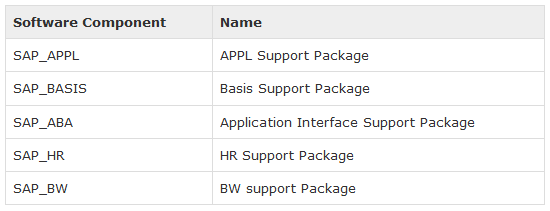
The following table shows some naming conventions for Support Packages:
Conflict Resolution Transport − This is used to adjust the support packages on add on. A CRT for one release also contains adjustment for earlier releases of this add-on.
Requirements to implement support package
A support package is always implemented on client 000 and user should have an authorization equivalent to DDIC or SAP.
To implement a support package, use transaction code — SPAM. You can check if any previous package is in progress or is incomplete. If there is an incomplete support package, you can’t proceed with the implementation of a new one.
About SAP BASIS Online Training
SAP Trainings Online is a deceptively simple e-learning and SAP training authoring solution. Create super-effective training content and deliver courses via Virtual and implant in existing systems. It is very important for BASIS consultant to have hands on experience on live servers. It is right to have training because every scenario could not be created just by installing SAP. We provide training in many countries India, USA, UK, Canada, Australia, and New Zealand.
Register with us for free demo: www.saptrainingsonline.com/student-registration
For more details visit: www.saptrainingsonline.com
Email: contact@saptrainingsonline.com
Contact: India +91 9052775398 USA +1315282580